Angular 中构建自定义结构指令
Angular 内置的结构指令
- *ngIf
- *ngFor
- *ngSwitch
创建自定义结构指令-仿写*ngIf
创建一个自定义指令
ng generate directive customIf生成的指令应该是这样的
import { Directive } from '@angular/core';

@Directive({
  selector: '[customIf]',
})
export class customIfDirective {
  constructor() {}
}
完成如下 传递的值为 true 时,实现显示内容的功能
<h2 *customIf="true">My visible content</h2>
<h2 *customIf="false">My hidden content</h2>
为了实现这一点,我们需要几个元素:
- 决定 显示/隐藏 的输入布尔值 (@Input)
- 有条件地显示的模板的引用(TemplateRef)
- 一个容器,承载模板的 Angular 视图(ViewContainerRef)
@input装饰器 为了让它像显示的示例代码中那样工作*customIf="true",我们需要将接收属性的命名设成和指令选择器相同:
import { Directive, Input } from '@angular/core';

@Directive({
  selector: '[customIf]',
})
export class IfDirective {
 @Input() set customIf(show: boolean) {
    //code goes here
  }

  constructor() {}
}
现在指令可以接收传进来的布尔值,我们利用布尔值来决定是否将模板内容挂在到容器。 模板视图的引用TemplateRef 和 视图容器的引用ViewContainerRef可以通过从 @angular/core 导入它们:
import { TemplateRef, ViewContainerRef } from '@angular/core';

constructor(
    private templateRef: TemplateRef<unknown>,
    private vcr: ViewContainerRef
  ) {}
现在,我们可以使用视图容器 ViewContainerRef 的createEmbeddedView()方法来挂在模板视图
this.vcr.createEmbeddedView(this.templateRef)显示 、 this.vcr.clear() 删除。
最终代码
@Directive({
  selector: '[customIf]',
})
export class IfDirective {
@Input() set customIf(value: boolean) {
    this._renderTemplate(value)l
  }

constructor(
    private templateRef: TemplateRef<unknown>,
    private vcr: ViewContainerRef
  ) {}

private _renderTemplate(show: boolean) {
    this.vcr.clear();
    if (show) {
      this.vcr.createEmbeddedView(this.templateRef);
    }
  }
}
现在已经创建成功 *customIf 下面让我们创建else模板。
先了解ngIf的else是如何工作的,下面把 ngIf的语法糖展开看看
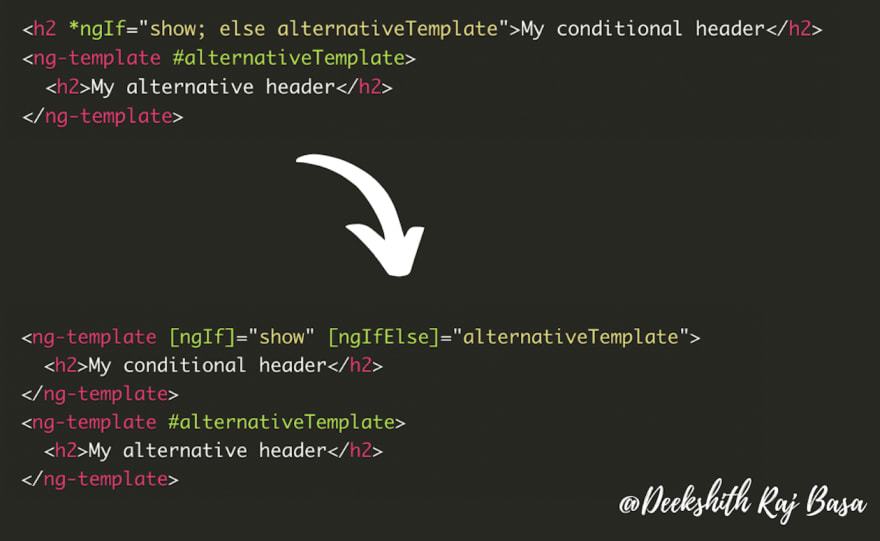
else 实际上会转成 ngIfElse 输入参数。
规则为:selector (customIf) + else (Else) = customIfElse
所以我们可以通过@Input接收 customIfElse属性来获取else的输入模板
@Input() customIfElse?: TemplateRef<unknown>;
现在,代码看起来像
@Directive({
  selector: '[customIf]',
})
export class IfDirective {
@Input() set customIf(value: boolean) {
    this._renderTemplate(value)l
  }
@Input() customIfElse?: TemplateRef<unknown>;
constructor(
    private templateRef: TemplateRef<unknown>,
    private vcr: ViewContainerRef
  ) {}

private _renderTemplate(show: boolean) {
    this.vcr.clear();
    if (show) {
      this.vcr.createEmbeddedView(this.templateRef);
    } else if (this.customIfElse) {
      this.vcr.createEmbeddedView(this.customIfElse);
    }
  }
}